Works
Schedule a call


SG Wireless
As the sole designer, I designed a complex web platform for SG Wireless that enables remote configuration and management of IoT modules. The project covered a wide spectrum, from core platform features to advanced network configurations like LoRa.
SG Wireless

Details
Client
SG Wireless

Industries
IoT (Internet of Things)
Locations
Canada
•
Hong Kong
•
Londra
My role
Freelance Product Designer
Tools
Figma
•
Miro
•
Rive
Project Duration
1 yr 2 mos
My role & Responsibilities
I worked with an international team (Canada and Hong Kong) of 7 developers, 1 Product Manager (PM), and 1 Engineering Manager. I was responsible for defining all pages and flows with the PM, creating wireframes and prototypes, designing reusable components, and handing off all designs to the development team.

Core IoT Platform Experience
Context
SG Wireless needed a centralized web platform where their customers could manage, monitor, and perform basic configurations on their purchased IoT modules. Prior to the project, there was no unified interface for these operations.
Problem
Users (typically engineers and developers) needed an easy and understandable way to add a new module to their account, connect it to the internet, and set its basic configurations (e.g., data transmission frequency). Without these foundational flows, the effective use of the modules was not possible.
Solution
A web platform was designed (UX & UI) to allow users to perform all fundamental operations from start to finish. This solution included core features such as user and account creation, registering a new module to the platform (onboarding), configuring the module's basic settings, and a simple dashboard to display data coming from the module.
Process
Requirements Definition
Worked closely with the Product Manager (PM) to map out the core features and user flows of the platform.
Module Onboarding Flow
Designed the critical user journey for activating a new module. This flow ensured that as soon as a module was powered on, it could be easily detected and linked to the user's account, establishing an immediate connection between the physical device and the platform.

Figma screenshot detailing the Module Onboarding Flow for the SG Wireless platform. It includes a user flow diagram for adding a new module and UI mockups for the device list and details pages, illustrating the critical journey of connecting a physical device to the user's account.
Information Visualization (Dashboard Design)
Designed the initial dashboard interface to provide users with at-a-glance insights. This included visualizing key module data such as online status, uptime duration, and the types of data being transmitted, allowing for effective monitoring.
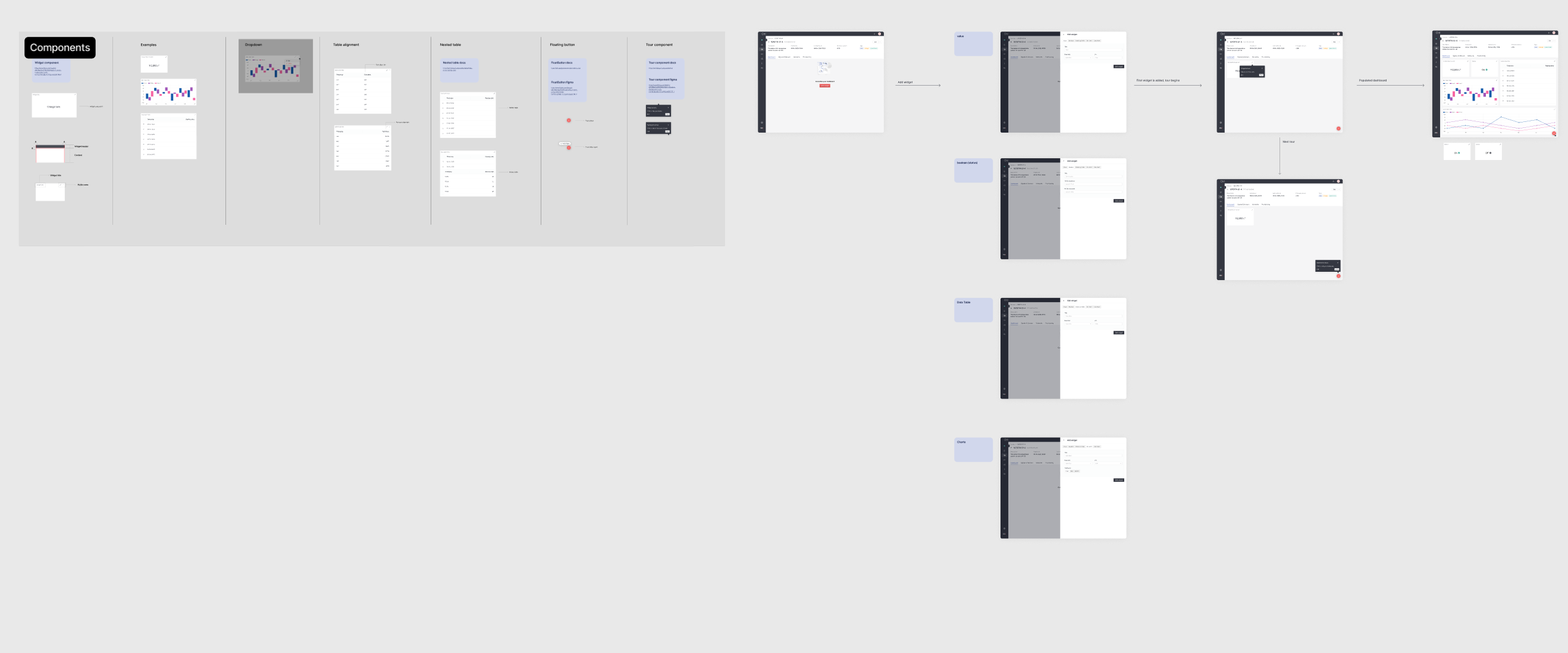
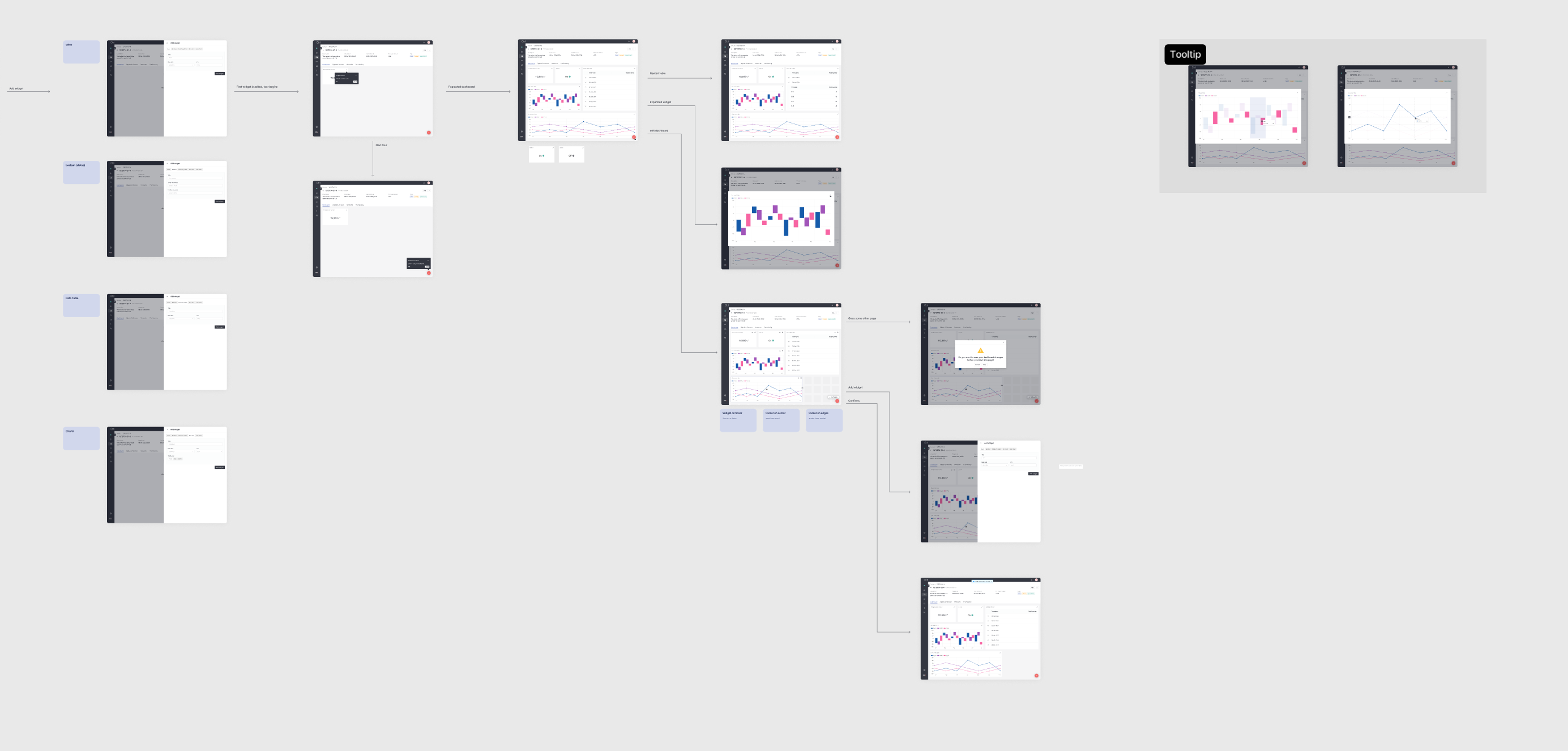
The design process for the SG Wireless dashboard, from initial wireframe layouts to more detailed data visualization components for effective monitoring.
Design & Approval
Created initial designs (wireframes) for the defined flows and obtained team approval.
Component-Based Design
Following the approval of the flows, all reusable interface components (buttons, form elements, tables, etc.) were designed to ensure consistency across the platform.
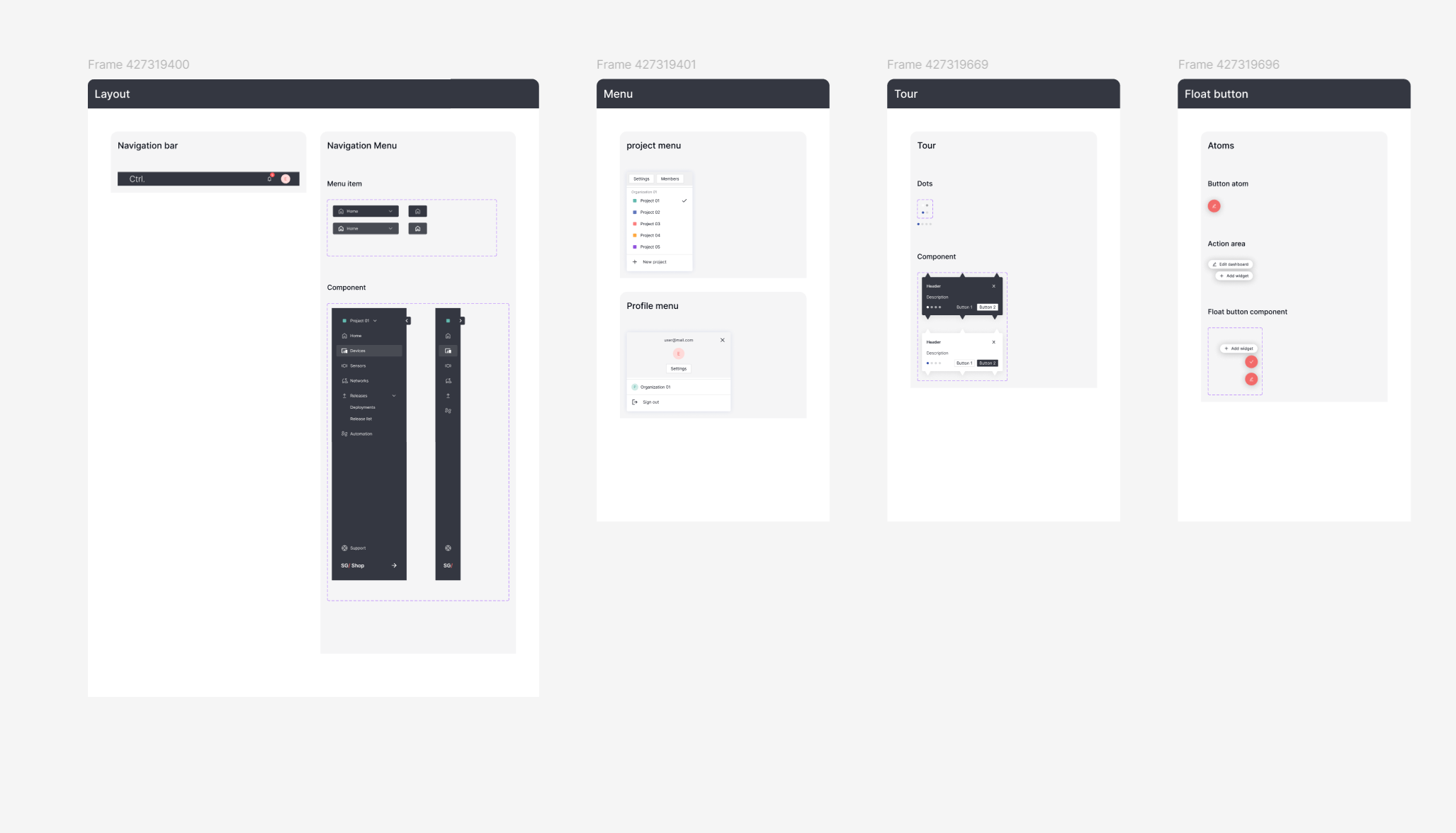
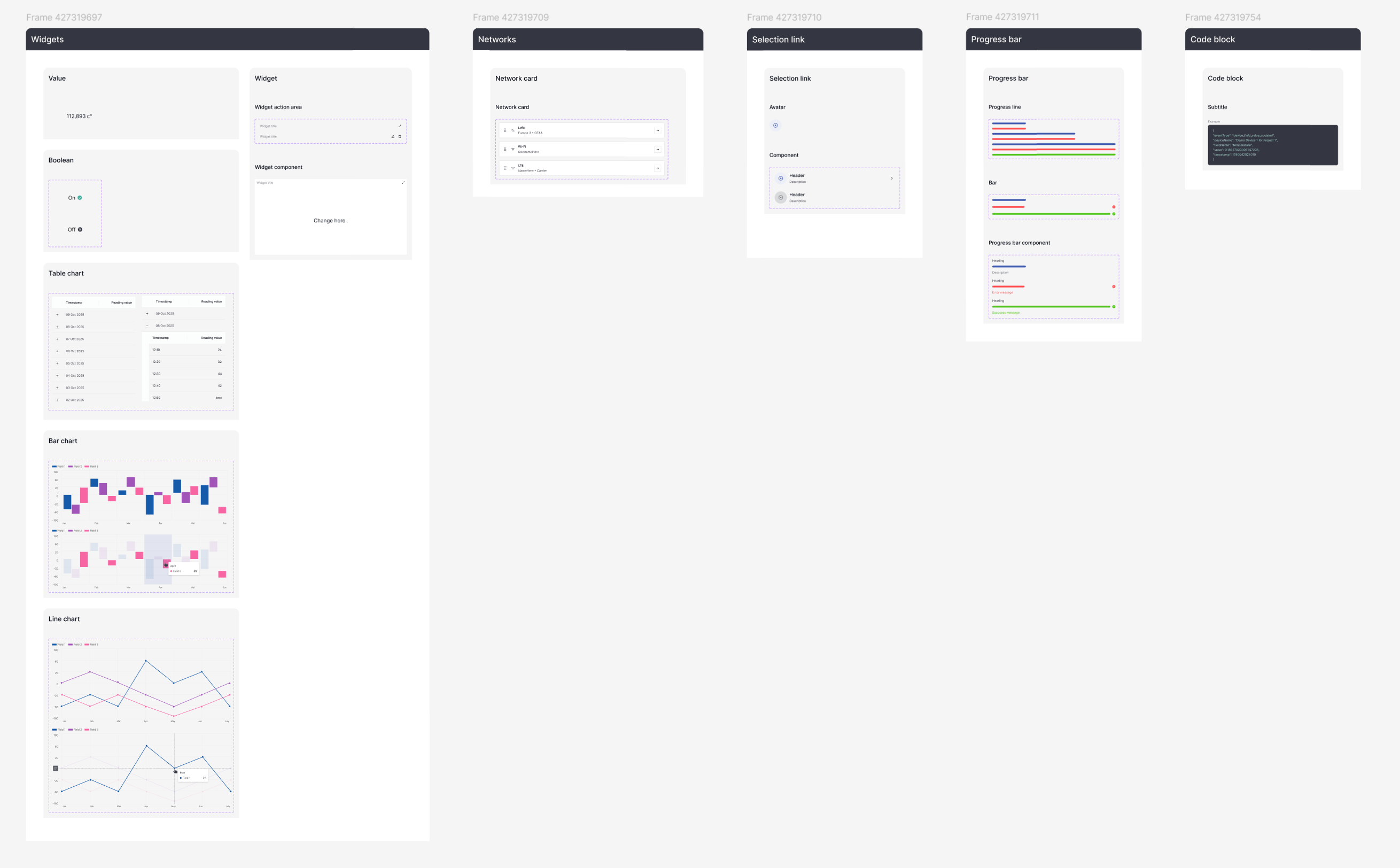
An overview of the reusable component library created for the SG Wireless project, demonstrating the systematic approach to building a consistent and scalable UI.
Detailed Prototyping
The behavior of components in different states (e.g., active, inactive, or pending state of a button) was demonstrated with detailed prototypes in Figma.
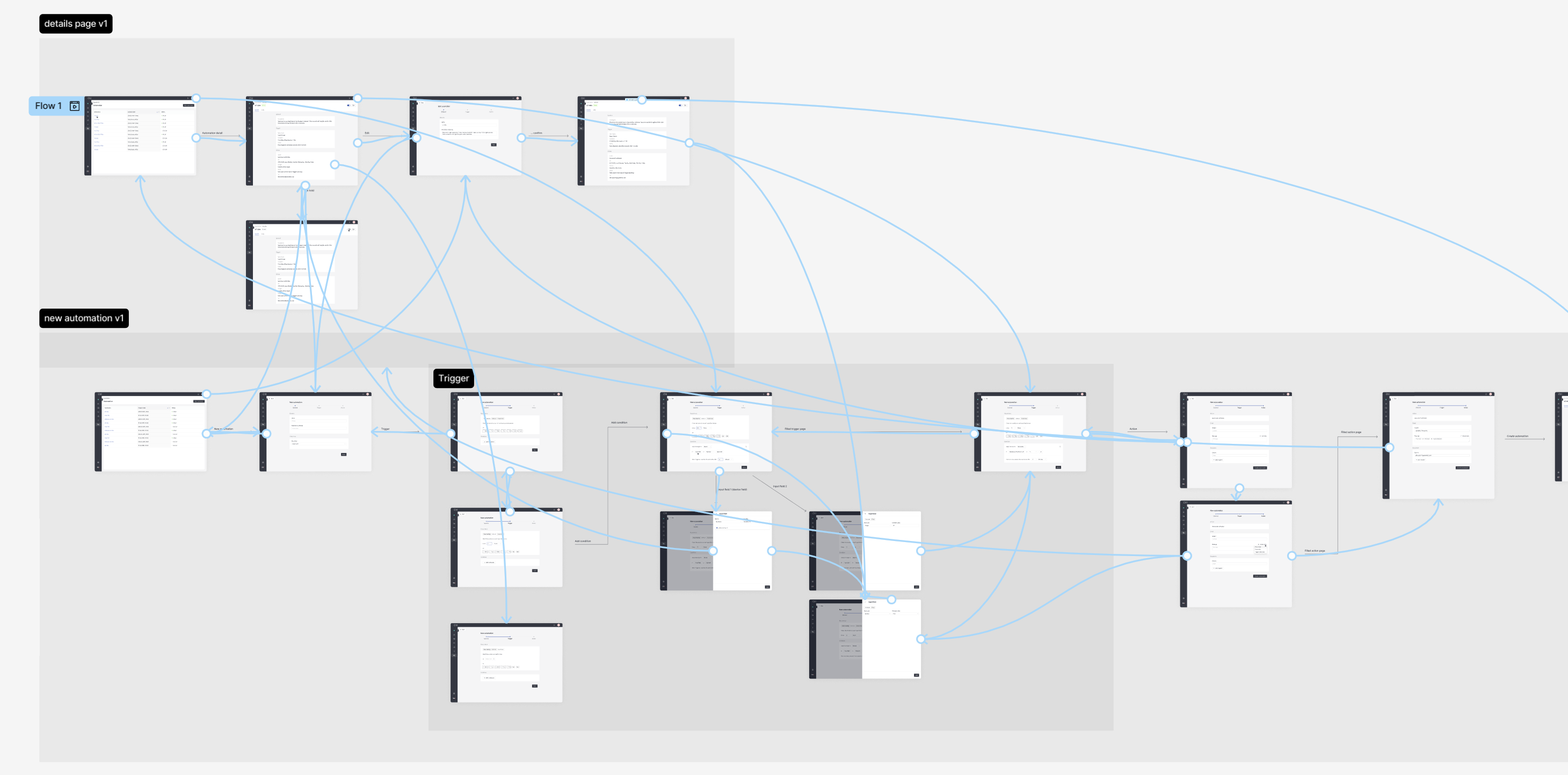
A detailed prototype map from Figma, showing the user flows and screen connections for the SG Wireless project.
Impact
Established Self-Service Capability
This core platform established a "self-service" capability for SG Wireless customers that did not exist before.
Increased Efficiency & Satisfaction
The streamlined module onboarding flow significantly reduced setup time, while the information visualization on the dashboard allowed for immediate device monitoring, directly improving user efficiency and satisfaction.
Built a Scalable Foundation
It created a solid foundation and a consistent design language upon which more complex features could be built.
Advanced Module and Network Configuration
Context
Building upon the core platform, advanced features were needed to allow technical users to make in-depth adjustments to the hardware and software layers of the modules. Configuring complex network technologies like LoRaWAN was a significant challenge.
Problem
There were no intuitive interfaces for engineers to select and configure a module's network connection (LoRa, LTE, WiFi), send remote firmware updates to the device, and integrate the platform with external services like Webhooks. The complex nature of the LoRa connection (e.g., managing keys like AppEUI, DevEUI) was particularly error-prone when done through text-based or command-line tools.
Solution
A series of user interfaces were designed to simplify these complex technical operations. The solution included step-by-step configuration wizards for different network types, a secure firmware update (FOTA - Firmware Over-the-Air) flow, and an interface where users could easily create and manage Webhook integrations.
Process
Technical Deep Dive
Worked closely with the engineering team to deeply understand the technical requirements and complexities of technologies like LoRa, FOTA, and Webhooks.
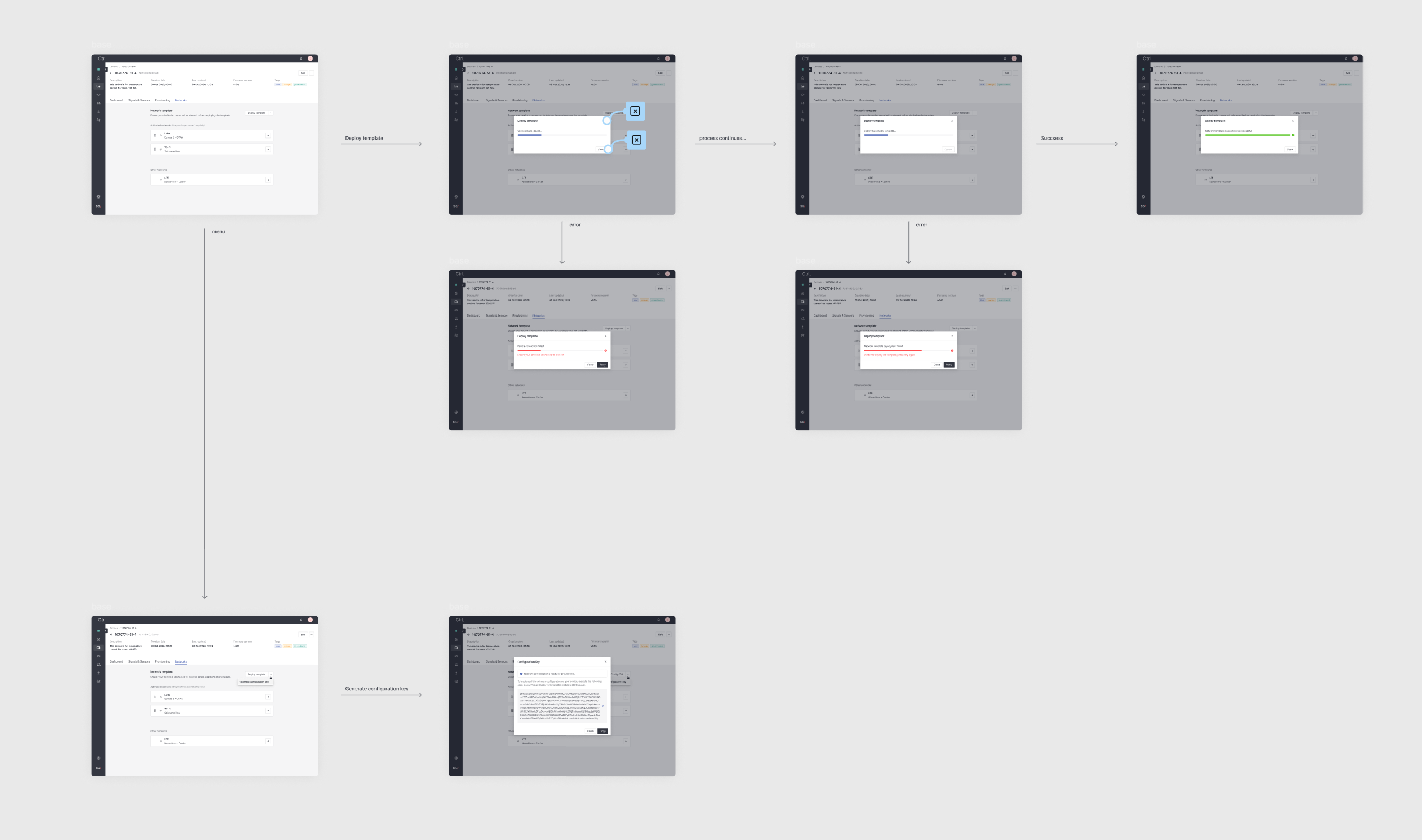
A step-by-step user flow diagram for a complex technical feature, resulting from a deep dive with the engineering team.
Flow Simplification
These complex technical processes were broken down into logical user flows that users could complete with fewer steps and fewer errors.
Automated Firmware Update Flow (FOTA)
Designed a highly automated flow for remotely updating module firmware. This process was structured to minimize user interaction while providing clear feedback, status tracking, and a system for collecting and displaying any errors that occurred during the update.
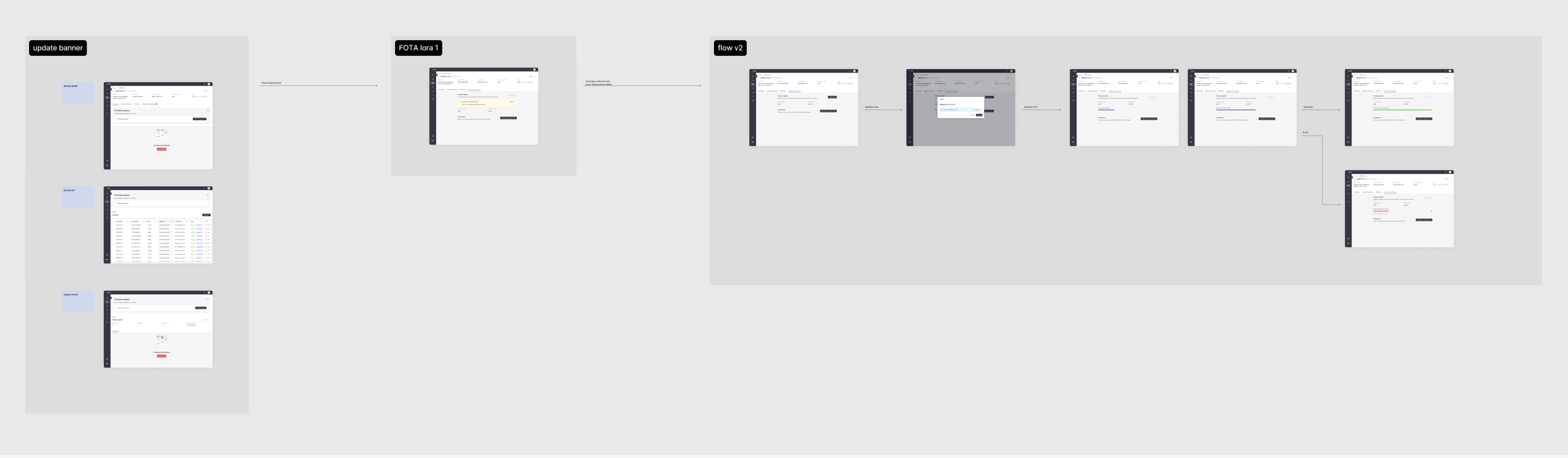
A user flow diagram from Figma illustrating the automated Firmware-Over-the-Air (FOTA) update process. This flow was designed to minimize user interaction and provide clear status feedback and error handling.
Integration Flow Design
Designed the user flow for setting up third-party integrations, allowing module data to be sent to external services like Webhooks, Amazon AWS, and Microsoft Azure.
A user flow diagram from Figma detailing the process for setting up third-party integrations. This flow allows module data to be sent to external services like Webhooks, Amazon AWS, and Microsoft Azure.
Information Architecture
Designed interfaces that presented information in a hierarchical and understandable way, especially for screens requiring a lot of technical information, like LoRa settings.
Interactive Prototypes
Created detailed and interactive prototypes that showed users step-by-step how to complete a network configuration or a firmware update.
An interactive prototype map from Figma, showing the user flows for advanced module configuration.
Impact
Reduced User Error and Time Savings
Allowing complex technical settings to be configured through a visual interface significantly reduced the likelihood of user error and saved time.
Increased LoRa Accessibility
Simplifying the LoRa configuration process, in particular, made this technology more accessible to a wider range of users.
Reliable Remote Management
The automated FOTA process provided a reliable and secure way to manage remote devices, while the error handling system gave users confidence and clarity during critical updates.
Enhanced Platform Extensibility
The intuitive flow for setting up integrations with services like Webhooks, AWS, and Azure allowed users to easily connect the platform to their existing workflows, significantly increasing its value.
Works
Schedule a call
SG Wireless
As the sole designer, I designed a complex web platform for SG Wireless that enables remote configuration and management of IoT modules. The project covered a wide spectrum, from core platform features to advanced network configurations like LoRa.
SG Wireless
Details
Client
SG Wireless
Industries
IoT (Internet of Things)
Locations
Canada
•
Hong Kong
•
Londra
My role
Freelance Product Designer
Tools
Figma
•
Miro
•
Rive
Project Duration
1 yr 2 mos
My role & Responsibilities
I worked with an international team (Canada and Hong Kong) of 7 developers, 1 Product Manager (PM), and 1 Engineering Manager. I was responsible for defining all pages and flows with the PM, creating wireframes and prototypes, designing reusable components, and handing off all designs to the development team.

Core IoT Platform Experience
Context
SG Wireless needed a centralized web platform where their customers could manage, monitor, and perform basic configurations on their purchased IoT modules. Prior to the project, there was no unified interface for these operations.
Problem
Users (typically engineers and developers) needed an easy and understandable way to add a new module to their account, connect it to the internet, and set its basic configurations (e.g., data transmission frequency). Without these foundational flows, the effective use of the modules was not possible.
Solution
A web platform was designed (UX & UI) to allow users to perform all fundamental operations from start to finish. This solution included core features such as user and account creation, registering a new module to the platform (onboarding), configuring the module's basic settings, and a simple dashboard to display data coming from the module.
Process
Requirements Definition
Worked closely with the Product Manager (PM) to map out the core features and user flows of the platform.
Module Onboarding Flow
Designed the critical user journey for activating a new module. This flow ensured that as soon as a module was powered on, it could be easily detected and linked to the user's account, establishing an immediate connection between the physical device and the platform.
Figma screenshot detailing the Module Onboarding Flow for the SG Wireless platform. It includes a user flow diagram for adding a new module and UI mockups for the device list and details pages, illustrating the critical journey of connecting a physical device to the user's account.
Information Visualization (Dashboard Design)
Designed the initial dashboard interface to provide users with at-a-glance insights. This included visualizing key module data such as online status, uptime duration, and the types of data being transmitted, allowing for effective monitoring.
The design process for the SG Wireless dashboard, from initial wireframe layouts to more detailed data visualization components for effective monitoring.
Design & Approval
Created initial designs (wireframes) for the defined flows and obtained team approval.
Component-Based Design
Following the approval of the flows, all reusable interface components (buttons, form elements, tables, etc.) were designed to ensure consistency across the platform.
An overview of the reusable component library created for the SG Wireless project, demonstrating the systematic approach to building a consistent and scalable UI.
Detailed Prototyping
The behavior of components in different states (e.g., active, inactive, or pending state of a button) was demonstrated with detailed prototypes in Figma.
A detailed prototype map from Figma, showing the user flows and screen connections for the SG Wireless project.
Impact
Established Self-Service Capability
This core platform established a "self-service" capability for SG Wireless customers that did not exist before.
Increased Efficiency & Satisfaction
The streamlined module onboarding flow significantly reduced setup time, while the information visualization on the dashboard allowed for immediate device monitoring, directly improving user efficiency and satisfaction.
Built a Scalable Foundation
It created a solid foundation and a consistent design language upon which more complex features could be built.
Advanced Module and Network Configuration
Context
Building upon the core platform, advanced features were needed to allow technical users to make in-depth adjustments to the hardware and software layers of the modules. Configuring complex network technologies like LoRaWAN was a significant challenge.
Problem
There were no intuitive interfaces for engineers to select and configure a module's network connection (LoRa, LTE, WiFi), send remote firmware updates to the device, and integrate the platform with external services like Webhooks. The complex nature of the LoRa connection (e.g., managing keys like AppEUI, DevEUI) was particularly error-prone when done through text-based or command-line tools.
Solution
A series of user interfaces were designed to simplify these complex technical operations. The solution included step-by-step configuration wizards for different network types, a secure firmware update (FOTA - Firmware Over-the-Air) flow, and an interface where users could easily create and manage Webhook integrations.
Process
Technical Deep Dive
Worked closely with the engineering team to deeply understand the technical requirements and complexities of technologies like LoRa, FOTA, and Webhooks.
A step-by-step user flow diagram for a complex technical feature, resulting from a deep dive with the engineering team.
Flow Simplification
These complex technical processes were broken down into logical user flows that users could complete with fewer steps and fewer errors.
Automated Firmware Update Flow (FOTA)
Designed a highly automated flow for remotely updating module firmware. This process was structured to minimize user interaction while providing clear feedback, status tracking, and a system for collecting and displaying any errors that occurred during the update.
A user flow diagram from Figma illustrating the automated Firmware-Over-the-Air (FOTA) update process. This flow was designed to minimize user interaction and provide clear status feedback and error handling.
Integration Flow Design
Designed the user flow for setting up third-party integrations, allowing module data to be sent to external services like Webhooks, Amazon AWS, and Microsoft Azure.
A user flow diagram from Figma detailing the process for setting up third-party integrations. This flow allows module data to be sent to external services like Webhooks, Amazon AWS, and Microsoft Azure.
Information Architecture
Designed interfaces that presented information in a hierarchical and understandable way, especially for screens requiring a lot of technical information, like LoRa settings.
Interactive Prototypes
Created detailed and interactive prototypes that showed users step-by-step how to complete a network configuration or a firmware update.
An interactive prototype map from Figma, showing the user flows for advanced module configuration.
Impact
Reduced User Error and Time Savings
Allowing complex technical settings to be configured through a visual interface significantly reduced the likelihood of user error and saved time.
Increased LoRa Accessibility
Simplifying the LoRa configuration process, in particular, made this technology more accessible to a wider range of users.
Reliable Remote Management
The automated FOTA process provided a reliable and secure way to manage remote devices, while the error handling system gave users confidence and clarity during critical updates.
Enhanced Platform Extensibility
The intuitive flow for setting up integrations with services like Webhooks, AWS, and Azure allowed users to easily connect the platform to their existing workflows, significantly increasing its value.
Works
Schedule a call

Ekin Aydemir
Product designer
Work experience
2025

Now
Design System & Motion Designer at Midas
2023
2025
Self Employed Product Designer at Duck rocks
2023
2025
Product Designer at bitaksi
2022
2023
Product Designer at Appcent
2019
2022
Freelance Product Designer
Education
2018
2022
Bachelor of Industrial Design at Middle East Technical University

Download CV
SG Wireless
As the sole designer, I designed a complex web platform for SG Wireless that enables remote configuration and management of IoT modules. The project covered a wide spectrum, from core platform features to advanced network configurations like LoRa.
SG Wireless
Details
Client
SG Wireless
Industries
IoT (Internet of Things)
Locations
Canada
•
Hong Kong
•
Londra
My role
Freelance Product Designer
Tools
Figma
•
Miro
•
Rive
Project Duration
1 yr 2 mos
My role & Responsibilities
I worked with an international team (Canada and Hong Kong) of 7 developers, 1 Product Manager (PM), and 1 Engineering Manager. I was responsible for defining all pages and flows with the PM, creating wireframes and prototypes, designing reusable components, and handing off all designs to the development team.

Core IoT Platform Experience
Context
SG Wireless needed a centralized web platform where their customers could manage, monitor, and perform basic configurations on their purchased IoT modules. Prior to the project, there was no unified interface for these operations.
Problem
Users (typically engineers and developers) needed an easy and understandable way to add a new module to their account, connect it to the internet, and set its basic configurations (e.g., data transmission frequency). Without these foundational flows, the effective use of the modules was not possible.
Solution
A web platform was designed (UX & UI) to allow users to perform all fundamental operations from start to finish. This solution included core features such as user and account creation, registering a new module to the platform (onboarding), configuring the module's basic settings, and a simple dashboard to display data coming from the module.
Process
Requirements Definition
Worked closely with the Product Manager (PM) to map out the core features and user flows of the platform.
Module Onboarding Flow
Designed the critical user journey for activating a new module. This flow ensured that as soon as a module was powered on, it could be easily detected and linked to the user's account, establishing an immediate connection between the physical device and the platform.
Figma screenshot detailing the Module Onboarding Flow for the SG Wireless platform. It includes a user flow diagram for adding a new module and UI mockups for the device list and details pages, illustrating the critical journey of connecting a physical device to the user's account.
Information Visualization (Dashboard Design)
Designed the initial dashboard interface to provide users with at-a-glance insights. This included visualizing key module data such as online status, uptime duration, and the types of data being transmitted, allowing for effective monitoring.
The design process for the SG Wireless dashboard, from initial wireframe layouts to more detailed data visualization components for effective monitoring.
Design & Approval
Created initial designs (wireframes) for the defined flows and obtained team approval.
Component-Based Design
Following the approval of the flows, all reusable interface components (buttons, form elements, tables, etc.) were designed to ensure consistency across the platform.
An overview of the reusable component library created for the SG Wireless project, demonstrating the systematic approach to building a consistent and scalable UI.
Detailed Prototyping
The behavior of components in different states (e.g., active, inactive, or pending state of a button) was demonstrated with detailed prototypes in Figma.
A detailed prototype map from Figma, showing the user flows and screen connections for the SG Wireless project.
Impact
Established Self-Service Capability
This core platform established a "self-service" capability for SG Wireless customers that did not exist before.
Increased Efficiency & Satisfaction
The streamlined module onboarding flow significantly reduced setup time, while the information visualization on the dashboard allowed for immediate device monitoring, directly improving user efficiency and satisfaction.
Built a Scalable Foundation
It created a solid foundation and a consistent design language upon which more complex features could be built.
Advanced Module and Network Configuration
Context
Building upon the core platform, advanced features were needed to allow technical users to make in-depth adjustments to the hardware and software layers of the modules. Configuring complex network technologies like LoRaWAN was a significant challenge.
Problem
There were no intuitive interfaces for engineers to select and configure a module's network connection (LoRa, LTE, WiFi), send remote firmware updates to the device, and integrate the platform with external services like Webhooks. The complex nature of the LoRa connection (e.g., managing keys like AppEUI, DevEUI) was particularly error-prone when done through text-based or command-line tools.
Solution
A series of user interfaces were designed to simplify these complex technical operations. The solution included step-by-step configuration wizards for different network types, a secure firmware update (FOTA - Firmware Over-the-Air) flow, and an interface where users could easily create and manage Webhook integrations.
Process
Technical Deep Dive
Worked closely with the engineering team to deeply understand the technical requirements and complexities of technologies like LoRa, FOTA, and Webhooks.
A step-by-step user flow diagram for a complex technical feature, resulting from a deep dive with the engineering team.
Flow Simplification
These complex technical processes were broken down into logical user flows that users could complete with fewer steps and fewer errors.
Automated Firmware Update Flow (FOTA)
Designed a highly automated flow for remotely updating module firmware. This process was structured to minimize user interaction while providing clear feedback, status tracking, and a system for collecting and displaying any errors that occurred during the update.
A user flow diagram from Figma illustrating the automated Firmware-Over-the-Air (FOTA) update process. This flow was designed to minimize user interaction and provide clear status feedback and error handling.
Integration Flow Design
Designed the user flow for setting up third-party integrations, allowing module data to be sent to external services like Webhooks, Amazon AWS, and Microsoft Azure.
A user flow diagram from Figma detailing the process for setting up third-party integrations. This flow allows module data to be sent to external services like Webhooks, Amazon AWS, and Microsoft Azure.
Information Architecture
Designed interfaces that presented information in a hierarchical and understandable way, especially for screens requiring a lot of technical information, like LoRa settings.
Interactive Prototypes
Created detailed and interactive prototypes that showed users step-by-step how to complete a network configuration or a firmware update.
An interactive prototype map from Figma, showing the user flows for advanced module configuration.
Impact
Reduced User Error and Time Savings
Allowing complex technical settings to be configured through a visual interface significantly reduced the likelihood of user error and saved time.
Increased LoRa Accessibility
Simplifying the LoRa configuration process, in particular, made this technology more accessible to a wider range of users.
Reliable Remote Management
The automated FOTA process provided a reliable and secure way to manage remote devices, while the error handling system gave users confidence and clarity during critical updates.
Enhanced Platform Extensibility
The intuitive flow for setting up integrations with services like Webhooks, AWS, and Azure allowed users to easily connect the platform to their existing workflows, significantly increasing its value.